October 7th through 9th, 2005
Weekend Immersion in Nursing Informatics (WINI)
Puget Sound Nursing Informatics and Bellevue Community College, Life Science Informatics Center present a weekend of learning and continuing education credit for the nursing professional with an incurable interest in technology. Nationally recognized nursing informatics educators will conduct the weekend session, open to participants from all over the nation. Approved by the Maryland Nurses Association, an approved provider of nursing continuing education, WINI focuses on basic competencies in nursing informatics.
Registration information and program brochure is available at: http://www.bcc.ctc.edu/informatics/lsicevents.htm.
The Puget Sound Nursing Informatics Fall meeting and dinner will follow the Friday opening session. So this is really two events in one.
Tuesday, June 7, 2011

Rugged Tablet PC - UberTablet Braniac Test
UberTablet.blogspot.com is an Aussie Tablet PC Blog. Contrived by Uber Geek, Hugo Ortega, it has slowly become a means of expression for its creator. Sharing tales of struggles and tales of joy are often riddled with impulsive thoughts that are sometimes clever enough to remain memorable. On this occasion I write as would a young child about to describe his first ride on a brand new bicycle, or an adult telling tales of some flaunting nighttime madness. I’ve got something to share with you and it’s one of those moments that go off the scale on the cool-ometer.
Rugged Tablets! We’ve heard the hype, and some of us have even sampled the delights. There’s the obvious contender, the Panasonic Tough Book. It’s been recognized as a winner and championed in many a field as the Ruggedized Tablet to own, while iTronix also successfully bear a rather attractive Rugged Tablet PC too. In regards however to these genre of tablet the average Geek knows little and to that degree have experienced little exposure to the Ruggedized version of the Tablet PC.
As most of my readers will probably know Australia is a rugged country. We are famed with the Aussie Outback, a barren land that is barely inhabitable. You’ll also know of the Aussie bloke, barely impenetrable when it comes to showing any form of emotion – we’re tough bastards you see! So it brings me to my point – Rugged Tablet PC vendors in Australia.
I was recently fortunate enough to sit with Robert Ward, the Director of Sales for Xplore Technologies Asia Pacific. He was in Sydney for some Training so I took the opportunity to break bread with the man (at Doyle’s Waterfront Restaurant) and do what I do best, “Talk Tablet”.
Impressed with Mr. Wards passion for all things Tablet it seemed obvious we’d remain acquainted, supporting each others hunger to see Tablet PC awareness in Australia increase. We completed the meal and as I dropped him outside his hotel of choice I did what any Uber Geek would have done… I inquired… “gotta demo I can borrow for a couple of days?” At which point he winks, steps out of my vehicle and says, “see what we can do.”
Many amicable emails later and here I am with Xplore IX104T Tablet PC in hand (Slate form factor). We’ve not parted for several months and our relationship is STRONG. Thinking back to our seafood extravaganza, of Salmon for Robert and Kingfish for me, I recollect a passing comment that Robert made during our meal. “While visiting with the local Water Boards or Sewer Plants we often throw the Tablet into a sink full of water to show just how waterproof it is!” And he boasts of many successes coming from this very act. He goes onto explain that the Xplore Tablet is thrown into the sink full of water while turned on – and Robert proceeds to Ink on it while in a submerged state – COOL!
So my time has now come to bid my farewells. Mr. Ward has sent several emails requesting “Kathy” back – that’s what I call the demo unit allocated to me. As I start to box her up I feel a kryptonite type effect dawn over me. I’m somber in the knowledge that as of tomorrow I will revert to regular Tablet Geek and I’d have lost all ruggedeized powers. I also begin to consider that this muscled beast has been wasted with my humble efforts to test its abilities. I’m not Army, nor am I Navy. In fact my 4x4 only sees sealed roads and seldom did the Rugged Xplore Tablet even leave my doorstep apart from a journey to BHP Billiton mines by one of my resellers. I quickly remember the sewerage plant, of Robert Wards dinner time conversation, and I hastily make my way to the laundry...
Rugged Tablets! We’ve heard the hype, and some of us have even sampled the delights. There’s the obvious contender, the Panasonic Tough Book. It’s been recognized as a winner and championed in many a field as the Ruggedized Tablet to own, while iTronix also successfully bear a rather attractive Rugged Tablet PC too. In regards however to these genre of tablet the average Geek knows little and to that degree have experienced little exposure to the Ruggedized version of the Tablet PC.
As most of my readers will probably know Australia is a rugged country. We are famed with the Aussie Outback, a barren land that is barely inhabitable. You’ll also know of the Aussie bloke, barely impenetrable when it comes to showing any form of emotion – we’re tough bastards you see! So it brings me to my point – Rugged Tablet PC vendors in Australia.
I was recently fortunate enough to sit with Robert Ward, the Director of Sales for Xplore Technologies Asia Pacific. He was in Sydney for some Training so I took the opportunity to break bread with the man (at Doyle’s Waterfront Restaurant) and do what I do best, “Talk Tablet”.
Impressed with Mr. Wards passion for all things Tablet it seemed obvious we’d remain acquainted, supporting each others hunger to see Tablet PC awareness in Australia increase. We completed the meal and as I dropped him outside his hotel of choice I did what any Uber Geek would have done… I inquired… “gotta demo I can borrow for a couple of days?” At which point he winks, steps out of my vehicle and says, “see what we can do.”
Many amicable emails later and here I am with Xplore IX104T Tablet PC in hand (Slate form factor). We’ve not parted for several months and our relationship is STRONG. Thinking back to our seafood extravaganza, of Salmon for Robert and Kingfish for me, I recollect a passing comment that Robert made during our meal. “While visiting with the local Water Boards or Sewer Plants we often throw the Tablet into a sink full of water to show just how waterproof it is!” And he boasts of many successes coming from this very act. He goes onto explain that the Xplore Tablet is thrown into the sink full of water while turned on – and Robert proceeds to Ink on it while in a submerged state – COOL!
So my time has now come to bid my farewells. Mr. Ward has sent several emails requesting “Kathy” back – that’s what I call the demo unit allocated to me. As I start to box her up I feel a kryptonite type effect dawn over me. I’m somber in the knowledge that as of tomorrow I will revert to regular Tablet Geek and I’d have lost all ruggedeized powers. I also begin to consider that this muscled beast has been wasted with my humble efforts to test its abilities. I’m not Army, nor am I Navy. In fact my 4x4 only sees sealed roads and seldom did the Rugged Xplore Tablet even leave my doorstep apart from a journey to BHP Billiton mines by one of my resellers. I quickly remember the sewerage plant, of Robert Wards dinner time conversation, and I hastily make my way to the laundry...
The following is a short video that will walk you through just how rugged this Xplore Tablet really is. I realize that one picture is worth a thousand words, and with that I present you with the most inspiring display of rugged technology you’ll see on any blog. Oh! And as Uber Geek host of Brainiac Jon Tickle states: “we do these stunts ourselves so that you don’t have to”.
Download the file here: WMV[5.7MB]
For all the Uber Geeks I've added running commentary to this cut of the underwater test.
Download file with commentary: WMV [6.2MB]
Watch it on:YouTube.com
Watch it on:YouTube.com
- Do you have any rugged Tablet PC tales? (We'll host photo's for you!)
- Are you a vendor and want to share your Rugged Tablet with Australia?
- Did you know Microsoft talked about the Xplore Tablet way back in 2002?
- All WMV files were edited using Windows Movie Maker - free on Windows XP!
Saturday, June 4, 2011
Information System for Emergency Responders
For those nurses that are also pre-hospital first responders(like myself) take a look at this free tool from the National Library of Medicine at: http://wiser.nlm.nih.gov/ I just downloaded the Windows version to my Tablet PC. In a quick navigation of the application, it appears to be easy to use and full of good information.
New Hand–held Information System for Emergency Responders
Bethesda, Maryland — The National Library of Medicine (NLM), a component of the National Institutes of Health, has announced the release of a PDA software tool designed to help first responders when they arrive at a hazardous material (Hazmat) incident, such as a chemical spill.
WISER (Wireless Information System for Emergency Responders) provides the emergency responder with critical information on hazardous substances, including physical characteristics, human health data, and containment and suppression information. Employing the unique characteristics of a PDA (Personal Digital Assistant), WISER is customized for easy navigation and quick access to key information required by first responders. To aid decision making, users can specify the role they are currently performing at the scene of an incident, and WISER organizes the critical information in a sequence most relevant to a first responder on-the-scene, a Hazmat specialist, or an emergency medical specialist (EMS).
“First responders in general, and Hazmat units in particular, must make decisions quickly in handling hazardous-materials incidents,” says Dr. Jack Snyder, NLM Associate Director for Specialized Information Services. “They need accurate information about hazardous substances, emergency resources available, and surrounding environmental conditions to save lives and minimize environmental impacts. WISER provides this lifesaving service.”
Snyder observed that WISER will be an indispensable tool for first responders in their efforts to combat the growing incidence of hazardous material incidents in the United States. Based on statistics collected by the U.S. Coast Guard’s National Response Center on all hazardous substances and waste released into the U.S. environment, Hazmat incidents have been increasing yearly since 1991, with approximately 34,000 incidents reported in 2004.
A useful feature of WISER is support for identifying an unknown substance. Using input about observed physical properties of the unknown substance, along with reported symptoms and observable signs among victims, WISER can help the user narrow the range of substances that may be involved in a specific incident. As the emergency responder selects observed properties and symptoms, WISER looks in its database for chemical substances that have these characteristics. The list of candidate chemicals decreases as additional information is provided, and WISER presents the user with a list of candidate chemicals at any point in the identification process.
The operational versions of WISER for Palm OS and for Pocket PC are now available without charge for downloading to users’ PDAs at http://WISER.nlm.nih.gov. More than 1700 copies of the WISER software have been requested and downloaded. A desktop version will be available later this spring, and a web-based version is also being developed.
NLM is collaborating with regional and local emergency response organizations and using their feedback as input for future enhancements to WISER. For example, NLM is working with CapWIN, an integrated transportation and criminal justice information wireless network across Maryland, Virginia, and the District of Columbia. WISER has been added as a resource to this network, providing easy access to authoritative chemical information.
WISER is also being incorporated into training curricula, such as the Baltimore County, Maryland Hazmat Team training program, the Illinois Fire Service Institute and the Federal Emergency Management Agency’s (FEMA) Chemical Stockpile Emergency Preparedness Program.
New Hand–held Information System for Emergency Responders
Bethesda, Maryland — The National Library of Medicine (NLM), a component of the National Institutes of Health, has announced the release of a PDA software tool designed to help first responders when they arrive at a hazardous material (Hazmat) incident, such as a chemical spill.
WISER (Wireless Information System for Emergency Responders) provides the emergency responder with critical information on hazardous substances, including physical characteristics, human health data, and containment and suppression information. Employing the unique characteristics of a PDA (Personal Digital Assistant), WISER is customized for easy navigation and quick access to key information required by first responders. To aid decision making, users can specify the role they are currently performing at the scene of an incident, and WISER organizes the critical information in a sequence most relevant to a first responder on-the-scene, a Hazmat specialist, or an emergency medical specialist (EMS).
“First responders in general, and Hazmat units in particular, must make decisions quickly in handling hazardous-materials incidents,” says Dr. Jack Snyder, NLM Associate Director for Specialized Information Services. “They need accurate information about hazardous substances, emergency resources available, and surrounding environmental conditions to save lives and minimize environmental impacts. WISER provides this lifesaving service.”
Snyder observed that WISER will be an indispensable tool for first responders in their efforts to combat the growing incidence of hazardous material incidents in the United States. Based on statistics collected by the U.S. Coast Guard’s National Response Center on all hazardous substances and waste released into the U.S. environment, Hazmat incidents have been increasing yearly since 1991, with approximately 34,000 incidents reported in 2004.
A useful feature of WISER is support for identifying an unknown substance. Using input about observed physical properties of the unknown substance, along with reported symptoms and observable signs among victims, WISER can help the user narrow the range of substances that may be involved in a specific incident. As the emergency responder selects observed properties and symptoms, WISER looks in its database for chemical substances that have these characteristics. The list of candidate chemicals decreases as additional information is provided, and WISER presents the user with a list of candidate chemicals at any point in the identification process.
The operational versions of WISER for Palm OS and for Pocket PC are now available without charge for downloading to users’ PDAs at http://WISER.nlm.nih.gov. More than 1700 copies of the WISER software have been requested and downloaded. A desktop version will be available later this spring, and a web-based version is also being developed.
NLM is collaborating with regional and local emergency response organizations and using their feedback as input for future enhancements to WISER. For example, NLM is working with CapWIN, an integrated transportation and criminal justice information wireless network across Maryland, Virginia, and the District of Columbia. WISER has been added as a resource to this network, providing easy access to authoritative chemical information.
WISER is also being incorporated into training curricula, such as the Baltimore County, Maryland Hazmat Team training program, the Illinois Fire Service Institute and the Federal Emergency Management Agency’s (FEMA) Chemical Stockpile Emergency Preparedness Program.
TC1100 Discontinued - death of a mate
Like any major loss, the decision made by HP to discontinue its TC1100 Tablet PC reverberated throughout the net with certain sadness. Even some of my favourite bloggers like Rob Busway, and James Kendrick were moved enough to mention the event online. Since becoming an owner of the device myself in late 2005 the news of it’s elimination from the HP line was devastating.
The little TC1100 hybrid is a Tablet of note. It carries itself with sophistication and a certain funkiness that few convertibles can match. It’s light, practical and profoundly efficient at getting daily tasks completed. For those of you that own the TC1100 I know that you’ll empathize with my note; still, while we lament this decision we must also look forward to yet another notebook-looking tablet PC by HP. We seem to have frightened the major vendors into some form of aesthetic compliance, maybe one of the new IEEE standards, that requires all notebooks to be of a certain shape, color, dimension and ergonomic line.
If only iPod flavored Tablet PC’s would grace the market place then perhaps the little teenee’s would all queue for hours to preorder our preferred PCB – the Tablet, only to later mark them up and post them on Ebay to the anticipating public. We could release them in numbered batches, like works of art, and hold Christies type auctions, by invitation only of course, and sell Tablet PC to the rich and famous – leaving the average geek only the ability to download PDF’s and stick them on his wall!
…hold on someone’s pinging me on IM…
I’m back!
Bloody TC1100! It’s too small to call a laptop and too big to call a PDA. As I went into Tablet mode to ink to my mate on messenger I seemed to have ripped the hinge off the keyboard…oops. I went to erase some text I’d hand written and scratched the glass on the screen – obviously forgetting that the standard TC1100 pen didn’t ship with an eraser on top but instead with a metal capped tether mount that really cut grooves in Tablet screens.
Guess I’ll speak to the wife in the morning and get some early budgetary approval for a new TC4200. I’ll miss you TC1100, but I think 3-months is long enough!
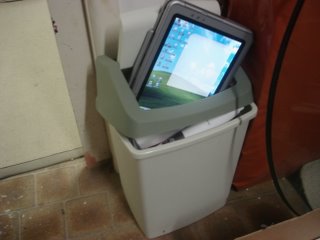
The little TC1100 hybrid is a Tablet of note. It carries itself with sophistication and a certain funkiness that few convertibles can match. It’s light, practical and profoundly efficient at getting daily tasks completed. For those of you that own the TC1100 I know that you’ll empathize with my note; still, while we lament this decision we must also look forward to yet another notebook-looking tablet PC by HP. We seem to have frightened the major vendors into some form of aesthetic compliance, maybe one of the new IEEE standards, that requires all notebooks to be of a certain shape, color, dimension and ergonomic line.
If only iPod flavored Tablet PC’s would grace the market place then perhaps the little teenee’s would all queue for hours to preorder our preferred PCB – the Tablet, only to later mark them up and post them on Ebay to the anticipating public. We could release them in numbered batches, like works of art, and hold Christies type auctions, by invitation only of course, and sell Tablet PC to the rich and famous – leaving the average geek only the ability to download PDF’s and stick them on his wall!
…hold on someone’s pinging me on IM…
I’m back!
Bloody TC1100! It’s too small to call a laptop and too big to call a PDA. As I went into Tablet mode to ink to my mate on messenger I seemed to have ripped the hinge off the keyboard…oops. I went to erase some text I’d hand written and scratched the glass on the screen – obviously forgetting that the standard TC1100 pen didn’t ship with an eraser on top but instead with a metal capped tether mount that really cut grooves in Tablet screens.
Guess I’ll speak to the wife in the morning and get some early budgetary approval for a new TC4200. I’ll miss you TC1100, but I think 3-months is long enough!
- What's your favorite Tablet PC?
- Are you upset that HP dropped the TC1100?
- Did you know Microsoft Infopath 'inks' out of the box when run on Tablet PC?
Tuesday, May 31, 2011
The day Dr. Neil came to my house.
He's a learned man, our Dr. Neil. A man of focus, passion and determined to be of significance. Ironically we met in the elevator of an apartment block my wife and I inhabited. It was 2001 and we were living in the beachside suburb of Dee Why, found on the Northern Peninsula of Sydney. I’d just completed my MCP and was feeling optimistic and invigorated. My first encounter with Dr. Neil wasn’t as memorable for me as I’d now like to recall, but it was eventful. I know that we connected at an umbilical level and shortly formed a sibling like relationship that would later encircle both our partners and my son Leon.
Four years on and Dr. Neil was in the country for yet another short stint. He’d left several messages that I’d ashamedly not replied to. Finally on the third day we connected and were able to talk. “I’ve got to come and see you”, he says, “There’s something you need to see”.
Fidgeting and restless, Dr. Neil hurriedly ate his meal. “I’ve got to show you that thing I told you about”, he proclaims wile masticating his last mouthful. We head to the lounge room and gather around an ottoman, dishes left idle at the dining table.
Falling in love, an event witnessed by many, is an emotion sometimes impetuous, sometimes cruel but always potent. Not knowing that my still rather untamed passion for IT was about to have a very rude awakening, I sat and waited. Dr. Neil ripped open the Velcro clad slip case and slid out the most attractive, most visually satisfying computer hardware I’d ever seen – a Tablet PC, and in this case the iTablet Slate PC.
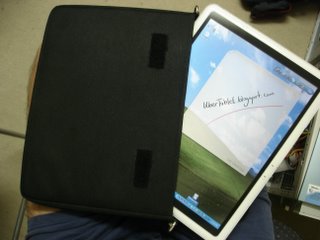
As unaware as I had been about the event about to unfold, I was also now unable to reply to this assault on my senses. “It’s a Tablet PC I found in the U.S”, he states, while simultaneously booting the device and ceremoniously drawing the digitizer pen from the screen itself. I found myself awed by the device and find it extremely difficult to contain my enthusiasm.
Dr. Neil Roodyn studied Software Architectures for Real Time Systems at University College London, for which he received a PhD, and is a Microsoft Tablet PC MVP; he’s an Author of two Tablet PC e-books and a textbook on Extreme Programming for .NET. We spent the rest of the evening going through the intricacies, the pro’s and con’s and a brief history of the device. I know that evening left a huge impact on my life as I’ve since become an owner of three different tablets, sampled tones of them and more recently got involved with distributing the devices in Australia and New Zealand. Had I known that Dr. Neil would have such a grand influence that very evening I probably would have spit polished my shoes, vacuumed, mopped and perhaps showered…oops. I’m forever indebted to that elevator in Dee Why and perhaps blessed in ways yet to become apparent. I know that Tablet PC, in all its majestic printed circuitry, is a device yet to make the splash it intended. When that splash eventually turns into a ripple however, and later a Tsunami, I’ll be surfing the bastard for all it’s worth!
Four years on and Dr. Neil was in the country for yet another short stint. He’d left several messages that I’d ashamedly not replied to. Finally on the third day we connected and were able to talk. “I’ve got to come and see you”, he says, “There’s something you need to see”.
Fidgeting and restless, Dr. Neil hurriedly ate his meal. “I’ve got to show you that thing I told you about”, he proclaims wile masticating his last mouthful. We head to the lounge room and gather around an ottoman, dishes left idle at the dining table.
Falling in love, an event witnessed by many, is an emotion sometimes impetuous, sometimes cruel but always potent. Not knowing that my still rather untamed passion for IT was about to have a very rude awakening, I sat and waited. Dr. Neil ripped open the Velcro clad slip case and slid out the most attractive, most visually satisfying computer hardware I’d ever seen – a Tablet PC, and in this case the iTablet Slate PC.

As unaware as I had been about the event about to unfold, I was also now unable to reply to this assault on my senses. “It’s a Tablet PC I found in the U.S”, he states, while simultaneously booting the device and ceremoniously drawing the digitizer pen from the screen itself. I found myself awed by the device and find it extremely difficult to contain my enthusiasm.
Dr. Neil Roodyn studied Software Architectures for Real Time Systems at University College London, for which he received a PhD, and is a Microsoft Tablet PC MVP; he’s an Author of two Tablet PC e-books and a textbook on Extreme Programming for .NET. We spent the rest of the evening going through the intricacies, the pro’s and con’s and a brief history of the device. I know that evening left a huge impact on my life as I’ve since become an owner of three different tablets, sampled tones of them and more recently got involved with distributing the devices in Australia and New Zealand. Had I known that Dr. Neil would have such a grand influence that very evening I probably would have spit polished my shoes, vacuumed, mopped and perhaps showered…oops. I’m forever indebted to that elevator in Dee Why and perhaps blessed in ways yet to become apparent. I know that Tablet PC, in all its majestic printed circuitry, is a device yet to make the splash it intended. When that splash eventually turns into a ripple however, and later a Tsunami, I’ll be surfing the bastard for all it’s worth!
- Have you met Dr. Neil Roodyn?
- Do you remember the first time you played with a Tablet PC? (kind of like, where were you when JFK was shot? or Princess Diana was killed?)
Happy Australia Day - 26th January 2006
There's something to be said about National Pride, its magic. As we gathered at Sydney's Harbourside Play-town, Darling Harbour, we knew that something special was in the air. We arrived at three in the afternoon and made our way to ‘I Thai’ restaurant on Cockle Bay Wharf (Lime Street side). The walk there was a visual feast of Patriotism and Nationalism, dancing with colour, and sound, designed to unite all attendees.
We ate our Coconut infused prawn entrée’s followed by curried vegetables and topped with sticky rice pudding for dessert. It was exciting now for my four year old, aware of the significance of this day, to partake in a form of controlled hooliganism. Later we strolled through a sea of Aussies and made our way to the paddle boats. There, as a young family, we revitalized our thighs by peddling our way around the manmade Darling Harbour Lake. “I want to climb” he yells, as we all grab an eye-full of the climbing rock. $6 later and the four year old, now 10 feet above me, is stuck, petrified, about the descent back down to street level. “Grab the rope with two hands”, she chastises, and he slowly descends back to us.
 It’s now 8 O’clock in the evening and we’ve nestled ourselves amongst our brethren. “Come-on Aussie”, belts out the Irish chap in front of me, “G’day Buddy”, mumbles the Indian grandfather next to me – Australia, you see, is still a land loved by all and inhabited by many. It doesn’t really matter where you're from to the Citizens of this Nation. What matters is your soul, and whether or not “a fair go” means a lot more to you than simply equality; as an Aussie ‘a fair go’ means a level of acceptance and safety known to us as a state of mind.
8:50pm and this huddle of 100,000 plus nationalists are delighted by bursts of colour created by $1,000,000 worth of fireworks. We cheer, we cry and somehow we bond - not by touch, smell or even language, but by merely participating. All our favourite theme songs of our childhood are played back to us, accompanied by this feast of redden above us.
Now 2 hours have passed and my son, Leon, remains on my shoulders. He high-fives those willing and makes whistle-like noises with high pitched screams. The car park is cluttered yet we all implausibly wave and smile while idly waiting our turn to exit. I must admit that on most given opportunities I’m neither too parochial or too evangelistic about my chosen Nationality, however, on this occasion I unconsciously dial my brother and wish him an Happy Australia Day, followed by my Mum & Dad, an Auntie, several friends and a Buddy now based in Tokyo.
Happy Australia Day and may you all be blessed in your country of choice as we are here.
We ate our Coconut infused prawn entrée’s followed by curried vegetables and topped with sticky rice pudding for dessert. It was exciting now for my four year old, aware of the significance of this day, to partake in a form of controlled hooliganism. Later we strolled through a sea of Aussies and made our way to the paddle boats. There, as a young family, we revitalized our thighs by peddling our way around the manmade Darling Harbour Lake. “I want to climb” he yells, as we all grab an eye-full of the climbing rock. $6 later and the four year old, now 10 feet above me, is stuck, petrified, about the descent back down to street level. “Grab the rope with two hands”, she chastises, and he slowly descends back to us.
 It’s now 8 O’clock in the evening and we’ve nestled ourselves amongst our brethren. “Come-on Aussie”, belts out the Irish chap in front of me, “G’day Buddy”, mumbles the Indian grandfather next to me – Australia, you see, is still a land loved by all and inhabited by many. It doesn’t really matter where you're from to the Citizens of this Nation. What matters is your soul, and whether or not “a fair go” means a lot more to you than simply equality; as an Aussie ‘a fair go’ means a level of acceptance and safety known to us as a state of mind.
8:50pm and this huddle of 100,000 plus nationalists are delighted by bursts of colour created by $1,000,000 worth of fireworks. We cheer, we cry and somehow we bond - not by touch, smell or even language, but by merely participating. All our favourite theme songs of our childhood are played back to us, accompanied by this feast of redden above us.
Now 2 hours have passed and my son, Leon, remains on my shoulders. He high-fives those willing and makes whistle-like noises with high pitched screams. The car park is cluttered yet we all implausibly wave and smile while idly waiting our turn to exit. I must admit that on most given opportunities I’m neither too parochial or too evangelistic about my chosen Nationality, however, on this occasion I unconsciously dial my brother and wish him an Happy Australia Day, followed by my Mum & Dad, an Auntie, several friends and a Buddy now based in Tokyo.
Happy Australia Day and may you all be blessed in your country of choice as we are here.
- Where do you come from?
- How do you celebrate your Nations Day?
Tablet PC Surgery - Scalpel Please!
Tablet Surgery requires extreme patience and concentration. Sometimes the most arduous task like resetting BIOS (in this case unplugging the battery for 3 seconds) can turn into a 45 minute marathon.
In UberTablet.blogspot.com we’ve promised to BLOG our Tablet PC experiences (Sydney, Australia). This experience is a visual feast for all you Hardware geeks, and Tablet PC enthusiasts to remember and share.
20:45 1st Feb 2006
Uber Nurse: Doctor, Doctor, we’ve lost the pulse…what do we do?
Uber Doctor: Give me a summation of the situation please nurse?
Uber Nurse: The victim (Tablet PC) came in at approximately 20:45. We initiated DC into the device and tried reboot – no avail! We’ve removed the battery pack and inserted 60GB of 5400rpm H.D.D and again no elation!! Currently we’ve not witnessed signs of life for approximately 90seconds. Family members, upon questioning, recall no odd behaviour prior to the event. “We’d placed a Gig of RAM in the device about a week ago”, one distraught family member recollects, “the next time I went to utilize the device I couldn’t wake her up”, he lamented just before bursting into tears.
Uber Doctor: Nurse, knowing that Microsoft Knowledge Base chronicle’s Hibernation issues with Tablet PC Edition 2005 ( http://support.microsoft.com/kb/893056) I recommend a BIOS reset and immediate FLASH after reboot.
Uber Nurse: But Doctor…
Uber Doctor: Nurse! Please! I’m familiar with the procedure; now hand me the 9mm philips screwdriver and initiate pouring of 350ml of Soda Water…for me please.
The following is a graphical record of BIOS resetting on the Sahara Slate PC. While the procedure may seem daunting, I will use all resources at my disposal to journal the event, for your future reference and mine.
Do not try this at home folks. I’m highly skilled, experienced, and have the replacement parts at hand in case things get ugly. It's important for you to know that this issue (as per Microsoft KB 893056) is now virtually non existant with Tablet PC. The key here is to have the latest Manufacturer BIOS installed on your Tablet at all times.
Lets begin:
Take 1x non-booting iTablet Slate PC (Sahara) and my trusty 100-in-1 Screwdriver set;
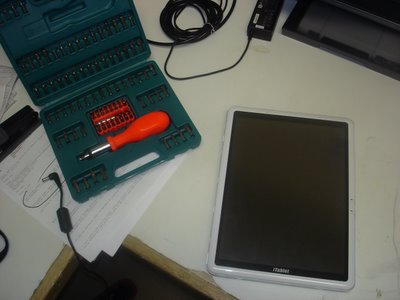
Now dismantle;
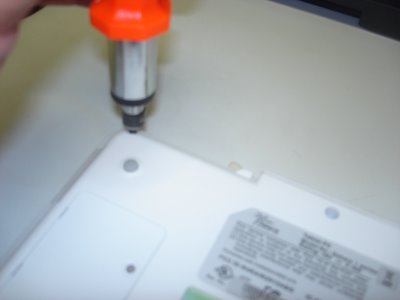
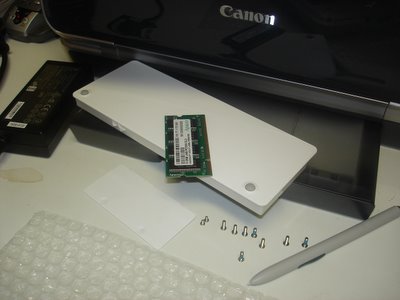
Take the RAM cover plate off and lift the memory module out (PC2700 184pin SDRAM), remove the Battery Pack, 8 medium sized screws, 2 small screws, and the Wacom Digitizer pen out of its sleeve - the bubble wrap is there to protect the Tablet from incidental scratches from my workbench;
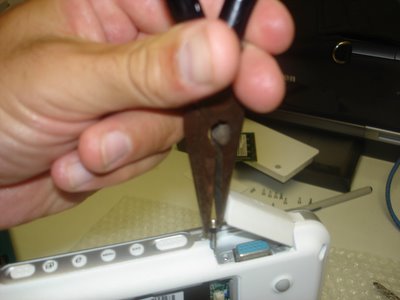
Unscrew the VGA connectors.
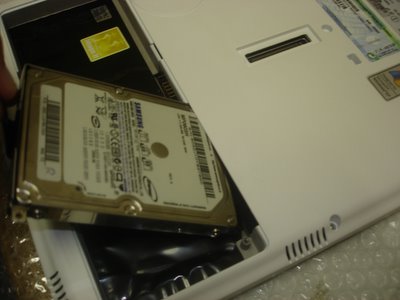
Now unscrew 1x small screw and you can pry out the 2.5" hard drive.
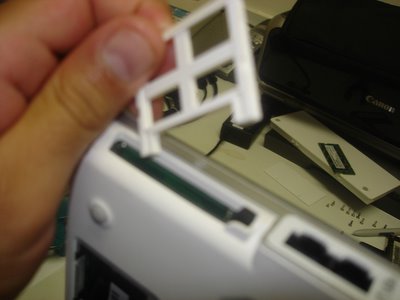
Almost forget, pop out CF slot protector from the CF slot.
Now stick your fingers in and CRACK, the case will begin to show some PCB. Can you smell it? mmmmm...
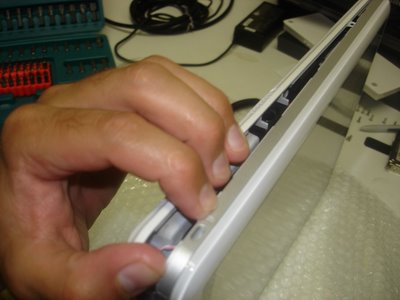
That's right, go where the sun don't shine!
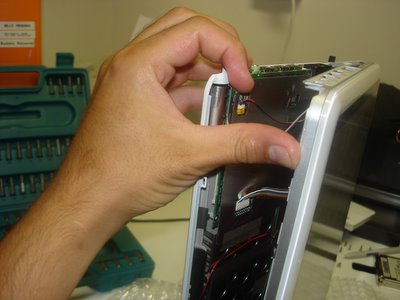
Now this is where your average Power User becomes Power-less, but not you, your an Uber Tablet Geek. Do you see the little ribbon cables, that's where your hands are gonna' surgically disconnect the screen from the motherboard.
Come on, get in there!
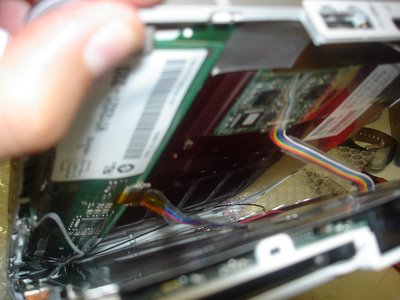
Well done Uber Geek! You've carefully peeled away both halves to unveil the most glorious look at your Wacom Digitizer board sitting on top of the Tablet PC screen (LEFT pic.), while the alloy shielded motherboard anxiously awaits its undressing.
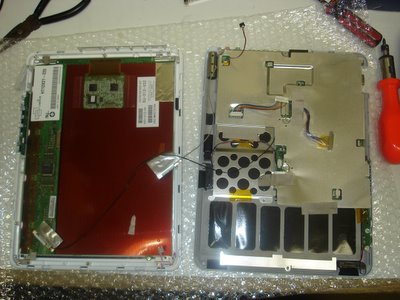
Don't let the beast intimidate you. Grab him, tame him, and unscrew the alloy shield and let's get to the motherboard!
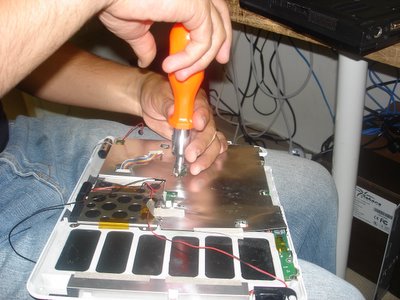
Now that we're at the guts of the machine, remove any of the remaining intestines (cables and connectors) from the motherboard.
You probably don't need to disconnect all the cables, but I just love pulling things apart.
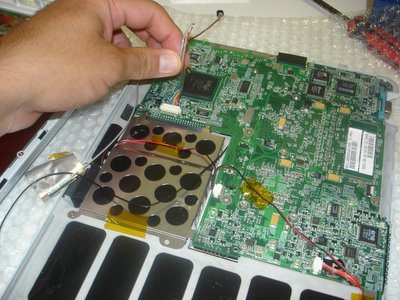
Release the motherboard from its human constraints (the case) and get ready to hit the PCB-spot.
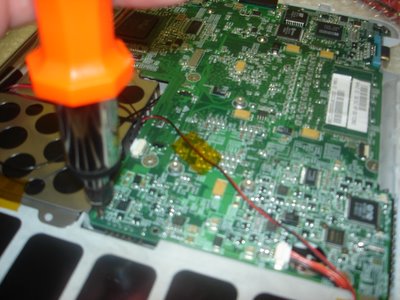
Now peel the case away from the motherboard, ensuring that you're not forcing them from each other.
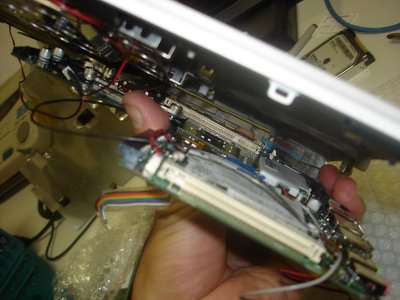
There she is, the under belly, a site that will either make your stomach turn or your heart race with excitement; either way it’s the device that has revolutionized the way a lot of us live.
Oh! There's the battery (in blue) that we've so eagerly gone hunting for. We’re now on the home stretch.
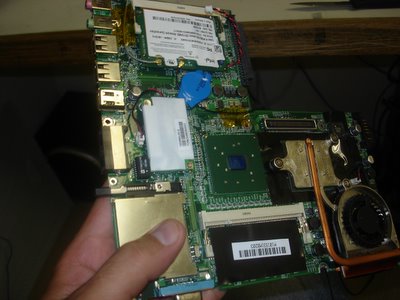
Now grab the 2-pin cconnector and seperate it from the motherboard for 3 seconds. You're done! Well done!
The BIOS is reset; now put it all back together you clown!
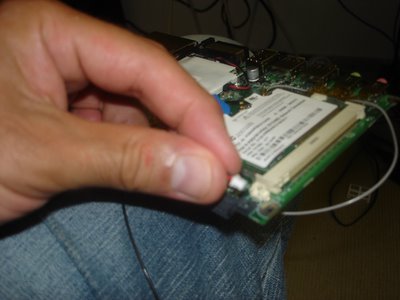
One last peek,
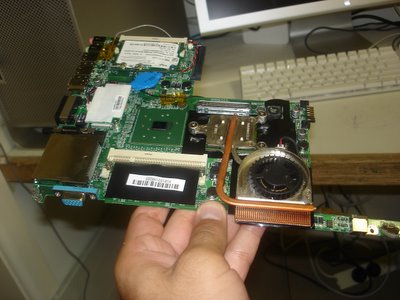
and back she goes. This unceremonious disrobing will soon be complete and the Tablet PC will live to INK another day.
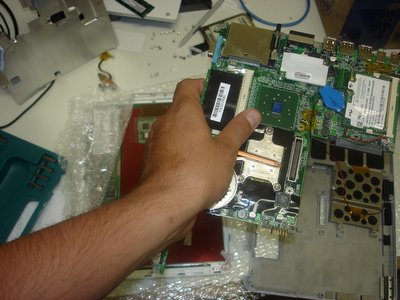
Turn the motherboard back over and secure it into place. Careful now, we don't want any screws left over!
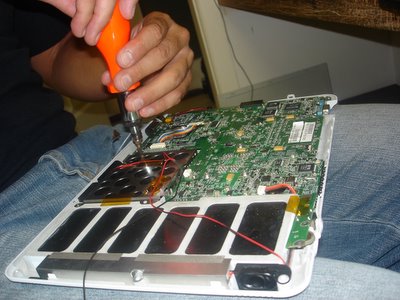
Alloy sheath back on, ribbon cables connected, and your almost ready to reunite both halves.
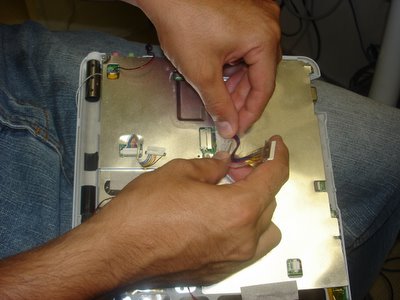
You'll require some finger gymnastics to really make this work so make sure you do your stretches.
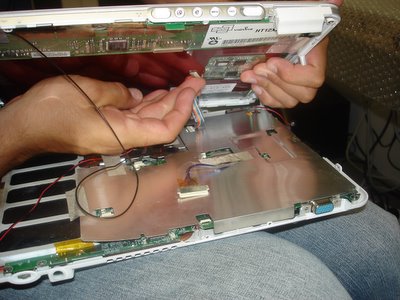
Don't forget to complete all the connections;
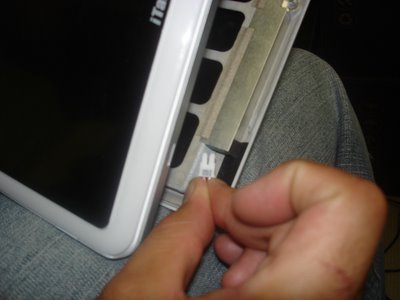
and I mean all of them.
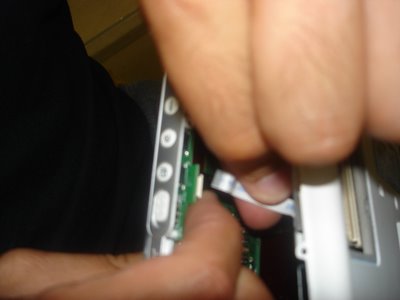
Wedge to two halves together, and fasten the screws again.
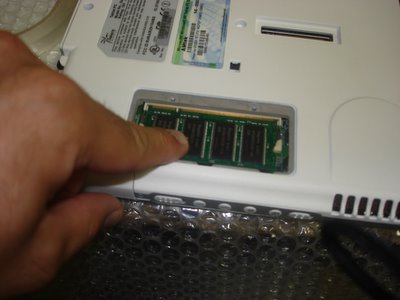
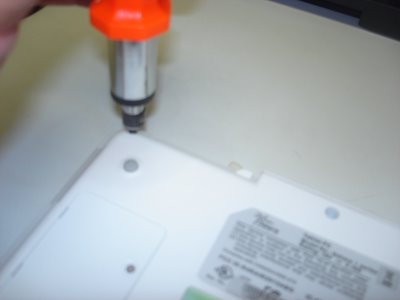 Put the RAM back,
 Hard Disk back,
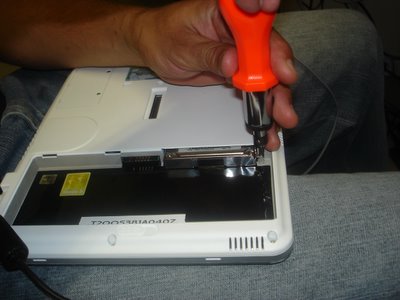
Battery Pack back,
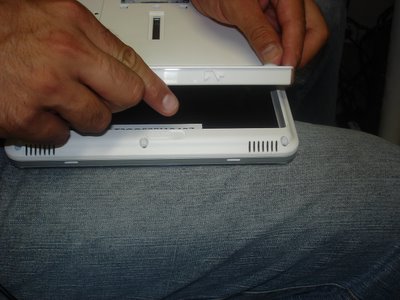
and you're all done Uber Geek.
In UberTablet.blogspot.com we’ve promised to BLOG our Tablet PC experiences (Sydney, Australia). This experience is a visual feast for all you Hardware geeks, and Tablet PC enthusiasts to remember and share.
20:45 1st Feb 2006
Uber Nurse: Doctor, Doctor, we’ve lost the pulse…what do we do?
Uber Doctor: Give me a summation of the situation please nurse?
Uber Nurse: The victim (Tablet PC) came in at approximately 20:45. We initiated DC into the device and tried reboot – no avail! We’ve removed the battery pack and inserted 60GB of 5400rpm H.D.D and again no elation!! Currently we’ve not witnessed signs of life for approximately 90seconds. Family members, upon questioning, recall no odd behaviour prior to the event. “We’d placed a Gig of RAM in the device about a week ago”, one distraught family member recollects, “the next time I went to utilize the device I couldn’t wake her up”, he lamented just before bursting into tears.
Uber Doctor: Nurse, knowing that Microsoft Knowledge Base chronicle’s Hibernation issues with Tablet PC Edition 2005 ( http://support.microsoft.com/kb/893056) I recommend a BIOS reset and immediate FLASH after reboot.
Uber Nurse: But Doctor…
Uber Doctor: Nurse! Please! I’m familiar with the procedure; now hand me the 9mm philips screwdriver and initiate pouring of 350ml of Soda Water…for me please.
The following is a graphical record of BIOS resetting on the Sahara Slate PC. While the procedure may seem daunting, I will use all resources at my disposal to journal the event, for your future reference and mine.
Do not try this at home folks. I’m highly skilled, experienced, and have the replacement parts at hand in case things get ugly. It's important for you to know that this issue (as per Microsoft KB 893056) is now virtually non existant with Tablet PC. The key here is to have the latest Manufacturer BIOS installed on your Tablet at all times.
Lets begin:
Take 1x non-booting iTablet Slate PC (Sahara) and my trusty 100-in-1 Screwdriver set;
Now dismantle;
Take the RAM cover plate off and lift the memory module out (PC2700 184pin SDRAM), remove the Battery Pack, 8 medium sized screws, 2 small screws, and the Wacom Digitizer pen out of its sleeve - the bubble wrap is there to protect the Tablet from incidental scratches from my workbench;
Unscrew the VGA connectors.
Now unscrew 1x small screw and you can pry out the 2.5" hard drive.
Almost forget, pop out CF slot protector from the CF slot.
Now stick your fingers in and CRACK, the case will begin to show some PCB. Can you smell it? mmmmm...
That's right, go where the sun don't shine!
Now this is where your average Power User becomes Power-less, but not you, your an Uber Tablet Geek. Do you see the little ribbon cables, that's where your hands are gonna' surgically disconnect the screen from the motherboard.
Come on, get in there!
Well done Uber Geek! You've carefully peeled away both halves to unveil the most glorious look at your Wacom Digitizer board sitting on top of the Tablet PC screen (LEFT pic.), while the alloy shielded motherboard anxiously awaits its undressing.
Don't let the beast intimidate you. Grab him, tame him, and unscrew the alloy shield and let's get to the motherboard!
Now that we're at the guts of the machine, remove any of the remaining intestines (cables and connectors) from the motherboard.
You probably don't need to disconnect all the cables, but I just love pulling things apart.
Release the motherboard from its human constraints (the case) and get ready to hit the PCB-spot.
Now peel the case away from the motherboard, ensuring that you're not forcing them from each other.
There she is, the under belly, a site that will either make your stomach turn or your heart race with excitement; either way it’s the device that has revolutionized the way a lot of us live.
Oh! There's the battery (in blue) that we've so eagerly gone hunting for. We’re now on the home stretch.
Now grab the 2-pin cconnector and seperate it from the motherboard for 3 seconds. You're done! Well done!
The BIOS is reset; now put it all back together you clown!
One last peek,
and back she goes. This unceremonious disrobing will soon be complete and the Tablet PC will live to INK another day.
Turn the motherboard back over and secure it into place. Careful now, we don't want any screws left over!
Alloy sheath back on, ribbon cables connected, and your almost ready to reunite both halves.
You'll require some finger gymnastics to really make this work so make sure you do your stretches.
Don't forget to complete all the connections;
and I mean all of them.
Wedge to two halves together, and fasten the screws again.
Put the RAM back, Hard Disk back,Battery Pack back,
and you're all done Uber Geek.
- Need any more information?
- Had any PCB wars of your own?
Subscribe to:
Comments (Atom)