Tuesday, May 31, 2011

The day Dr. Neil came to my house.

He's a learned man, our Dr. Neil. A man of focus, passion and determined to be of significance. Ironically we met in the elevator of an apartment block my wife and I inhabited. It was 2001 and we were living in the beachside suburb of Dee Why, found on the Northern Peninsula of Sydney. I’d just completed my MCP and was feeling optimistic and invigorated. My first encounter with Dr. Neil wasn’t as memorable for me as I’d now like to recall, but it was eventful. I know that we connected at an umbilical level and shortly formed a sibling like relationship that would later encircle both our partners and my son Leon.

Four years on and Dr. Neil was in the country for yet another short stint. He’d left several messages that I’d ashamedly not replied to. Finally on the third day we connected and were able to talk. “I’ve got to come and see you”, he says, “There’s something you need to see”.

Fidgeting and restless, Dr. Neil hurriedly ate his meal. “I’ve got to show you that thing I told you about”, he proclaims wile masticating his last mouthful. We head to the lounge room and gather around an ottoman, dishes left idle at the dining table.

Falling in love, an event witnessed by many, is an emotion sometimes impetuous, sometimes cruel but always potent. Not knowing that my still rather untamed passion for IT was about to have a very rude awakening, I sat and waited. Dr. Neil ripped open the Velcro clad slip case and slid out the most attractive, most visually satisfying computer hardware I’d ever seen – a Tablet PC, and in this case the iTablet Slate PC.


iTablet Slate PC, now known as the Sahara in Australia
As unaware as I had been about the event about to unfold, I was also now unable to reply to this assault on my senses. “It’s a Tablet PC I found in the U.S”, he states, while simultaneously booting the device and ceremoniously drawing the digitizer pen from the screen itself. I found myself awed by the device and find it extremely difficult to contain my enthusiasm.

Dr. Neil Roodyn studied Software Architectures for Real Time Systems at University College London, for which he received a PhD, and is a Microsoft Tablet PC MVP; he’s an Author of two Tablet PC e-books and a textbook on Extreme Programming for .NET. We spent the rest of the evening going through the intricacies, the pro’s and con’s and a brief history of the device. I know that evening left a huge impact on my life as I’ve since become an owner of three different tablets, sampled tones of them and more recently got involved with distributing the devices in Australia and New Zealand. Had I known that Dr. Neil would have such a grand influence that very evening I probably would have spit polished my shoes, vacuumed, mopped and perhaps showered…oops. I’m forever indebted to that elevator in Dee Why and perhaps blessed in ways yet to become apparent. I know that Tablet PC, in all its majestic printed circuitry, is a device yet to make the splash it intended. When that splash eventually turns into a ripple however, and later a Tsunami, I’ll be surfing the bastard for all it’s worth!


  • Have you met Dr. Neil Roodyn?
  • Do you remember the first time you played with a Tablet PC? (kind of like, where were you when JFK was shot? or Princess Diana was killed?)

Happy Australia Day - 26th January 2006

There's something to be said about National Pride, its magic. As we gathered at Sydney's Harbourside Play-town, Darling Harbour, we knew that something special was in the air. We arrived at three in the afternoon and made our way to ‘I Thai’ restaurant on Cockle Bay Wharf (Lime Street side). The walk there was a visual feast of Patriotism and Nationalism, dancing with colour, and sound, designed to unite all attendees.

We ate our Coconut infused prawn entrĂ©e’s followed by curried vegetables and topped with sticky rice pudding for dessert. It was exciting now for my four year old, aware of the significance of this day, to partake in a form of controlled hooliganism. Later we strolled through a sea of Aussies and made our way to the paddle boats. There, as a young family, we revitalized our thighs by peddling our way around the manmade Darling Harbour Lake. “I want to climb” he yells, as we all grab an eye-full of the climbing rock. $6 later and the four year old, now 10 feet above me, is stuck, petrified, about the descent back down to street level. “Grab the rope with two hands”, she chastises, and he slowly descends back to us.

It’s now 8 O’clock in the evening and we’ve nestled ourselves amongst our brethren. “Come-on Aussie”, belts out the Irish chap in front of me, “G’day Buddy”, mumbles the Indian grandfather next to me – Australia, you see, is still a land loved by all and inhabited by many. It doesn’t really matter where you're from to the Citizens of this Nation. What matters is your soul, and whether or not “a fair go” means a lot more to you than simply equality; as an Aussie ‘a fair go’ means a level of acceptance and safety known to us as a state of mind.

8:50pm and this huddle of 100,000 plus nationalists are delighted by bursts of colour created by $1,000,000 worth of fireworks. We cheer, we cry and somehow we bond - not by touch, smell or even language, but by merely participating. All our favourite theme songs of our childhood are played back to us, accompanied by this feast of redden above us.

Now 2 hours have passed and my son, Leon, remains on my shoulders. He high-fives those willing and makes whistle-like noises with high pitched screams. The car park is cluttered yet we all implausibly wave and smile while idly waiting our turn to exit. I must admit that on most given opportunities I’m neither too parochial or too evangelistic about my chosen Nationality, however, on this occasion I unconsciously dial my brother and wish him an Happy Australia Day, followed by my Mum & Dad, an Auntie, several friends and a Buddy now based in Tokyo.

Happy Australia Day and may you all be blessed in your country of choice as we are here.


  • Where do you come from?
  • How do you celebrate your Nations Day?

Tablet PC Surgery - Scalpel Please!

Tablet Surgery requires extreme patience and concentration. Sometimes the most arduous task like resetting BIOS (in this case unplugging the battery for 3 seconds) can turn into a 45 minute marathon.

In UberTablet.blogspot.com we’ve promised to BLOG our Tablet PC experiences (Sydney, Australia). This experience is a visual feast for all you Hardware geeks, and Tablet PC enthusiasts to remember and share.

20:45 1st Feb 2006

Uber Nurse: Doctor, Doctor, we’ve lost the pulse…what do we do?


Uber Doctor: Give me a summation of the situation please nurse?


Uber Nurse: The victim (Tablet PC) came in at approximately 20:45. We initiated DC into the device and tried reboot – no avail! We’ve removed the battery pack and inserted 60GB of 5400rpm H.D.D and again no elation!! Currently we’ve not witnessed signs of life for approximately 90seconds. Family members, upon questioning, recall no odd behaviour prior to the event. “We’d placed a Gig of RAM in the device about a week ago”, one distraught family member recollects, “the next time I went to utilize the device I couldn’t wake her up”, he lamented just before bursting into tears.


Uber Doctor: Nurse, knowing that Microsoft Knowledge Base chronicle’s Hibernation issues with Tablet PC Edition 2005 ( http://support.microsoft.com/kb/893056) I recommend a BIOS reset and immediate FLASH after reboot.


Uber Nurse: But Doctor…


Uber Doctor: Nurse! Please! I’m familiar with the procedure; now hand me the 9mm philips screwdriver and initiate pouring of 350ml of Soda Water…for me please.


The following is a graphical record of BIOS resetting on the Sahara Slate PC. While the procedure may seem daunting, I will use all resources at my disposal to journal the event, for your future reference and mine.

Do not try this at home folks. I’m highly skilled, experienced, and have the replacement parts at hand in case things get ugly. It's important for you to know that this issue (as per Microsoft KB 893056) is now virtually non existant with Tablet PC. The key here is to have the latest Manufacturer BIOS installed on your Tablet at all times.

Lets begin:
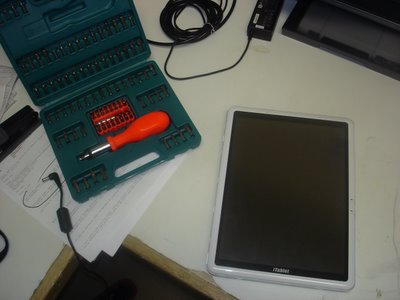
Take 1x non-booting iTablet Slate PC (Sahara) and my trusty 100-in-1 Screwdriver set;

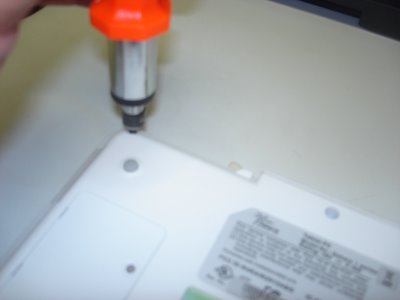
Now dismantle;

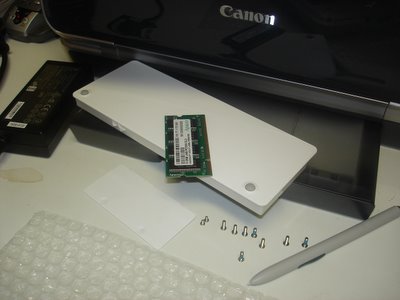
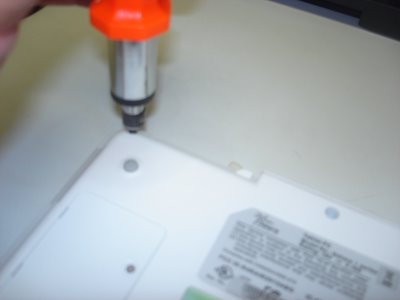
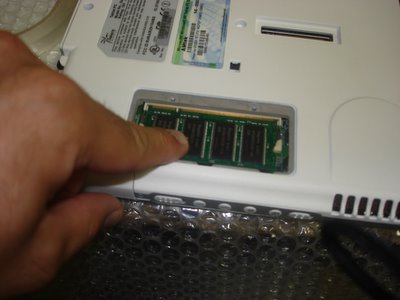
Take the RAM cover plate off and lift the memory module out (PC2700 184pin SDRAM), remove the Battery Pack, 8 medium sized screws, 2 small screws, and the Wacom Digitizer pen out of its sleeve - the bubble wrap is there to protect the Tablet from incidental scratches from my workbench;

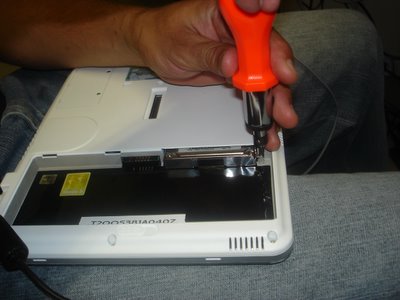
Unscrew the VGA connectors.

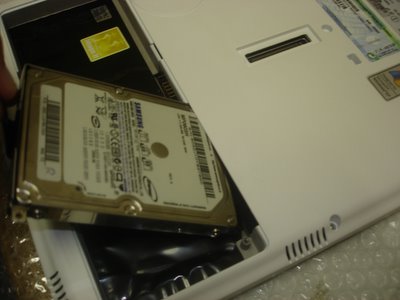
Now unscrew 1x small screw and you can pry out the 2.5" hard drive.

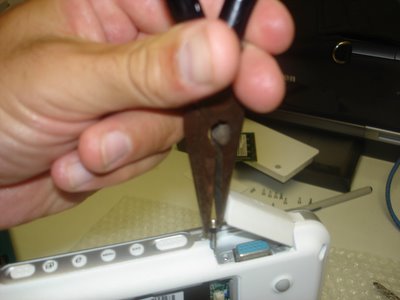
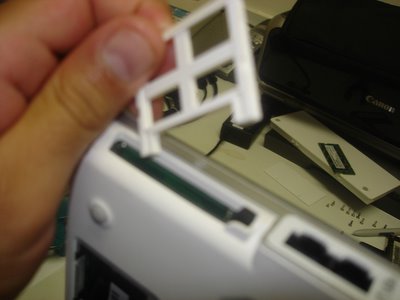
Almost forget, pop out CF slot protector from the CF slot.

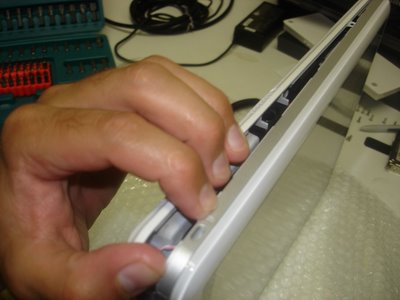
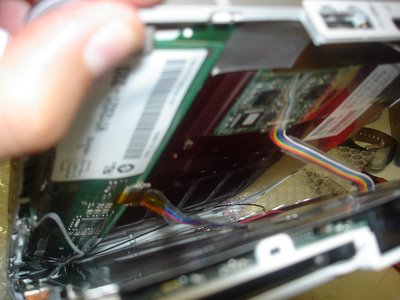
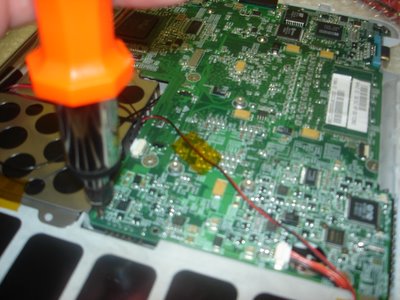
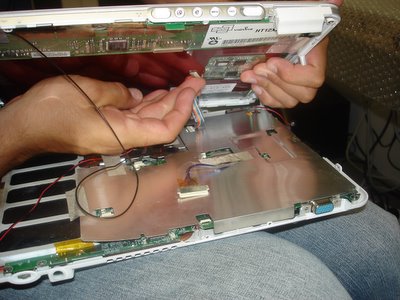
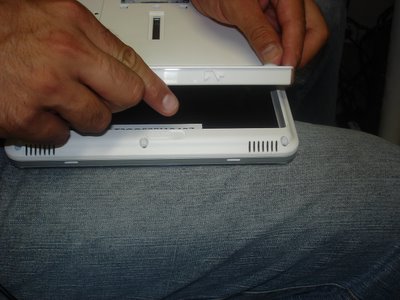
Now stick your fingers in and CRACK, the case will begin to show some PCB. Can you smell it? mmmmm...

That's right, go where the sun don't shine!

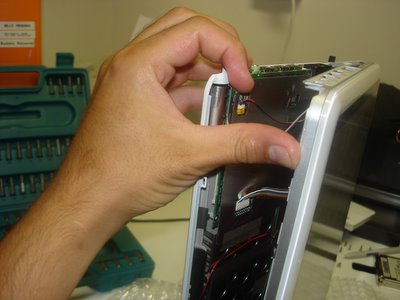
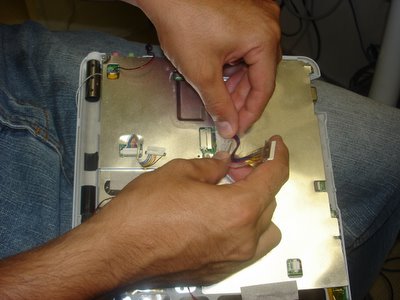
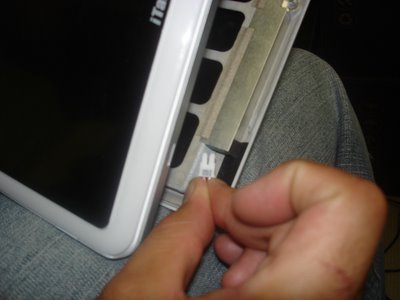
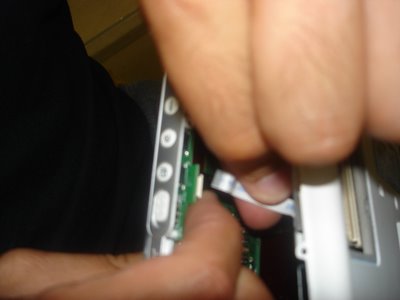
Now this is where your average Power User becomes Power-less, but not you, your an Uber Tablet Geek. Do you see the little ribbon cables, that's where your hands are gonna' surgically disconnect the screen from the motherboard.
Come on, get in there!

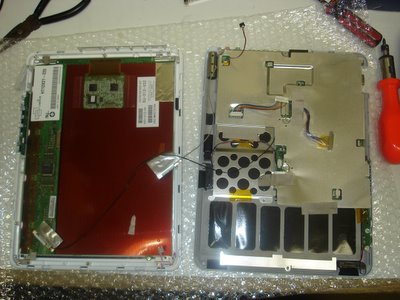
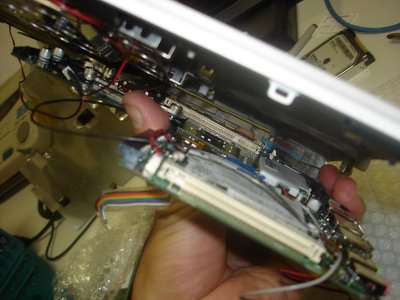
Well done Uber Geek! You've carefully peeled away both halves to unveil the most glorious look at your Wacom Digitizer board sitting on top of the Tablet PC screen (LEFT pic.), while the alloy shielded motherboard anxiously awaits its undressing.

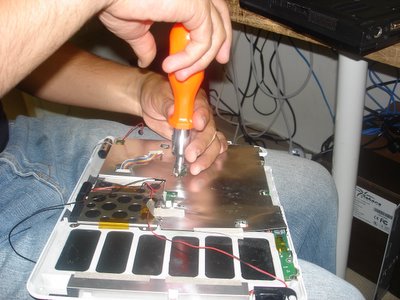
Don't let the beast intimidate you. Grab him, tame him, and unscrew the alloy shield and let's get to the motherboard!

Now that we're at the guts of the machine, remove any of the remaining intestines (cables and connectors) from the motherboard.
You probably don't need to disconnect all the cables, but I just love pulling things apart.

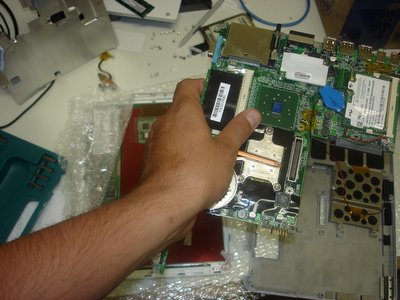
Release the motherboard from its human constraints (the case) and get ready to hit the PCB-spot.

Now peel the case away from the motherboard, ensuring that you're not forcing them from each other.

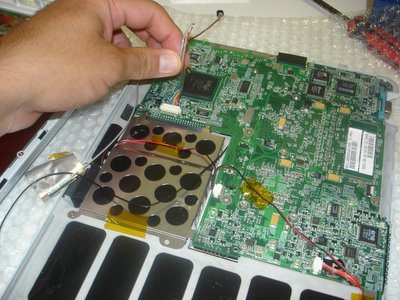
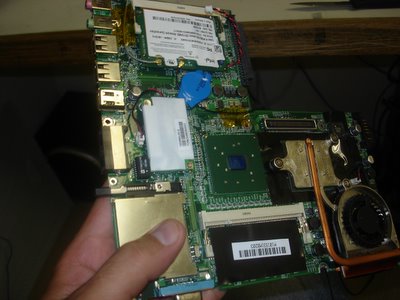
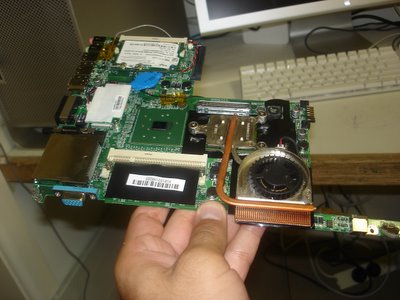
There she is, the under belly, a site that will either make your stomach turn or your heart race with excitement; either way it’s the device that has revolutionized the way a lot of us live.
Oh! There's the battery (in blue) that we've so eagerly gone hunting for. We’re now on the home stretch.

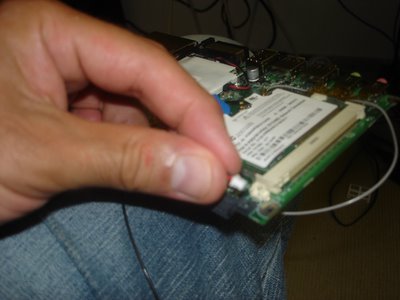
Now grab the 2-pin cconnector and seperate it from the motherboard for 3 seconds. You're done! Well done!
The BIOS is reset; now put it all back together you clown!

One last peek,


and back she goes. This unceremonious disrobing will soon be complete and the Tablet PC will live to INK another day.

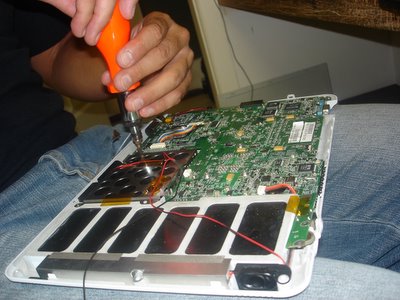
Turn the motherboard back over and secure it into place. Careful now, we don't want any screws left over!

Alloy sheath back on, ribbon cables connected, and your almost ready to reunite both halves.

You'll require some finger gymnastics to really make this work so make sure you do your stretches.

Don't forget to complete all the connections;

and I mean all of them.

Wedge to two halves together, and fasten the screws again.
Put the RAM back,
Hard Disk back,

Battery Pack back,


and you're all done Uber Geek.
Now watch the video and see if it works:

See if she boots - click here!!


  • Need any more information?
  • Had any PCB wars of your own?

Monday, May 30, 2011

ANDROID 2.0 TABLET PC Only $ 109.99


E-Book Reader: Fit an entire library in your palm! Reading is a joy on Android eBook Reader. Text looks crisp and bright. Pages turn with a tap. From classical literature to the latest bestsellers, from daily newspapers to special interest magazines, e-Reading has never been easier. It supports industry standard e-book formats(TXT, CHM, UMD, PDB, PDF), and you should download the reading software before use

A Whole New World - Over 150,000+ Apps - Android Market: With Marketplace, there are thousands of apps and widgets to get your Android eBook reader to do - well just about anything. Download any application you want from Android Market and customize your Android eBook reader to make it exclusively yours. You can choose from thousands more on the Android Market and download them with a tap. Featured Apps include News, Weather, Work, Social, Travel, Play, and more

New !CAPACITANCE TOUCH SCREEN Android Tablets

The Week, ITabletPCshop.com start a CAPACITANCE TOUCH SCREEN  Tablets PC ,

ANDROID TABLET PC CAPACITANCE DOUBLE TOUCH SCREEN
SPEC :
  • 7 inch TFT LCD Capacitive touch screen 800*480
  •  Support external 3G function
  •  CPU : Rockchip 2818 Dual Core(ARM+DSP) 600MHz
  •  RAM: 256MB DDR2 
  •  Storage: 2GB MLC Nand Flash
  •  Built-in USB HOST channel dedicated to support TD, WCDMA, EVDO etc. 3G module                                            
  •  FLASH: TV-OUT MLC 4GB (maximum support 32GB)
 HDMI: support HDMI 720P 

  •  

Android 2.1 Tablet PC 7 inch only $108.99


Screen Size: 7.0 inch mini touch screen. Delicate body, lightweight and portable
  • Android Operation System: Google Android 2.1 operating system. With your Google account, you can download a huge variety of free and paid software from the Android Market.
  • E-Book Reader: supports Word, Excel, PPT, PDF file format. Enjoy reading anywhere
  • WiFi: 802.11 b/g Check emails, connect online, or surf the Web with advanced WiFi technology.
  • Camera: 0.3M pixels, for photo shooting, video recording or video chatting
  • Communication software: Skype, MSN, Google Talk, E-mail, etc.
  • Language: Arabic, Bulgarian, Catalan, Croatian, Czech, Danish, Dutch, German, Greek, English, Spanish, Finnish, French, Hebrew, Hindi, Hungarian, Indonesia, Italian, Japanese, Korean, Latvian, Lithuanian, Norwegian, Polish, Portuguese, Romanian, Russian, Serbian, Slovak, Slovenian, Swedish, Tagalong, Thai, Turkish, Ukrainian, Vietnamese, Chinese.
Features:
      7.0 inch touch screen APad
  • The touch screen tablet PC supports Ethernet with a adapter
  • Media player (video, music, photo), digital picture frame, Internet web browser
  • Support 3G wireless network
  • The Google Android tablet PC Supports YouTube, Google map
  • Support TF card (up to 32GB)
  • Delicate body, lightweight and portable
  • The WiFi tablet PC supports external RJ45 Ethernet port


New !!7 " inch Android 2.2 VIA VM8650 Tablet PC

ITabletPCshop.com New Tablet PC android 2.2 7 inch VIA VM8650 Tablet PC
Spec :  WM8650,1.2 Ghz (High-performance 800MHZ CPU+400MHZ DSP)
             ANDROID 2.2 (Support Flash 10.1)
             Support multiple language
             3G support : E220/E230/E160X/E169G/E1750     Alcatel X060S/X200
             Built-in 30,0000 pixels  camera
Link : http://www.itabletpcshop.com/Android-2.2-Tablet-PC-VIA-VM8650-Google-Best-TabletPC

Flytouch 3 Pad Flytouch 3 Tablet PC

Review hot Flytouch 3 Pad Flytouch 3 Best Android 2.2 Tablet PC
The Flytouch 3 Tablet PC support flash 10.1 player and Built In GPS Support 3G 
Support 4 GB and 8GB Rom Processor 1Ghz and 512MB DDR2 Ram


Link : http://www.itabletpcshop.com/Flytouch-3-Android-2.2-Tablet-PC-10-inch-GPS-512MB-Super-Pad-TabletPC

Sunday, May 29, 2011

PlayStation 4 development confirmed by Sony

And the company is looking to cut costs - Sony has begun development on the PlayStation 4, with the games giant confirming that work on the console was already underway.

In Sony's year-on-year results of its Networked Products & Services division – which comprises the PlayStation brand and PCs – Sony hinted that it was working on the PlayStation 4 but would not give any more details.

PlayStation 4 plans

"For the home equipment the PS3 still has a product life," said Sony's Masaru Kato.

"But this is a platform business, so for the future platform – when we'll be introducing what product, I cannot discuss – but our development work is already under way, so the costs are incurred there."

Kato also explained that some cost-cutting will happen with the development of the PS4.

Speaking to investors, he said: "It is no longer thinkable to have a huge initial financial investment like that of the PS3."

This makes sense considering the amount of money Sony pumped into the PS3 in its initial development phases.

It was only with the launch of the PS3 Slim that Sony could actually count on making a profit with its next-gen games console.

Will the Motorola DROID Bionic have an OMAP processor under the hood rather than Tegra 2?

Recently we told you about about some specs for the Motorola DROID 3 gleaned from the NenaMark benchmark web site. On Saturday, the same site had some specs for the Motorola DROID Bionic. Regardless if this model is the Motorola Targa instead of the Etna, the DROID Bionic will have the PowerVR SGX 540 GPU on board, similar to the DROID 3. And that GPU seems to come only with a Texas Instruments OMAP 4 processor. If you are keeping a scorecard, you can scratch out the Tegra 2 and replace it with a dual-core 1GHz TI OMAP 4.

Also, according to the NenaMark site, the Motorola DROID Bionic will ship with Android 2.3.3 installed, which is an improvement from Froyo, but also means no Google Talk out of the box. While all reports say the device will come with a 4.3 inch screen, according to the benchmark site, the resolution will be qHD.

If there is one troubling aspect to NenaMark's benchmarking of the DROID Bionic, it is that it scored 24 on a benchmark test compared to a 45.70 score for the Motorola DROID 3. But it is still very early days for the former. Motorola has not officially confirmed that the DROID Bionic will be the Targa and there still is a lot of tweaking and fine tuning to do before the phone even gets introduced.

https://blogger.googleusercontent.com/img/b/R29vZ2xl/AVvXsEjLV5LGOOgjZHYvam8zA8VPrl-mgSLN8TkJrYfwM7Zye1vg0j_TiBJRx9_zGZskm2HBLduOdlIB-rckeUSgq9bYNqJL1UsncHCvnJFTfZJ3fOAlX3ONQ0rcsfU97OmkltVonS9OiRHprGc/s1600/nenamark.png

The NenaMark benchmark site suggests that the
Motorola DROID Bionic will come
with a TI OMAP4 1GHz dual-core processor under the hood

Windows 8 will start faster than Windows 7?

Despite a number of leaked roadmaps, the only official comment about the launch date comes from Windows president Steven Sinofsky: “Somewhere between 24 and 36 months between releases is what we aim for.” Counting from the 2009 release of Windows 7. that means sometime between 2011 and 2012.

https://blogger.googleusercontent.com/img/b/R29vZ2xl/AVvXsEiSDoabc4RO1escZ5g2SYsniZ-HZY38mg3zn8_49Cm9dXJYln3i3BumIdtwg0WoZUHLtH3e85mWgjsIpjhd_0Ff8uXuInv0V8kwld5177DVSFXZ2MtIVgG3tgUQyg91kkv6fv6J2j3_YF0/s1600/windows+8.jpg

For Windows tablets in particular, even resuming from hibernation is a lot slower than simply turning on the screen on your smartphone or tablet. With a fast SSD installed, Windows 7 can resume in as little as 14 seconds – but according to the leaked slides, only 9 per cent of people use hibernation today. Windows 8 will resume ‘instantly’ from sleep (under a second from standby), and that’s where Microsoft will be concentrating for slates. This makes sense if you have the battery life of ARM. The ReadyBoost cache that Windows 7 throws away every time you switch it on will be reused for speed, and Windows will prefetch more parts of the boot code based on what’s been loaded previous times.

But turning the device on in the first place has to be faster too. Microsoft hopes to achieve this with a new combined ‘logoff and hibernate’, which will become the standard way to turn PCs on and off (although the company plans to find a much better name, like ‘Shutdown’, ‘Turn off or ‘Power down’). To make this popular, turning off fast is also important; one rumor suggests that Microsoft is hoping to have all open files and processes saved in three to six seconds. Rather than just saving a copy of everything in memory and then reloading that huge file, Windows 8 might just save details of what to load in addition to the normal startup, which is much smaller. The system state will be broken up so that it saves drivers, system services, core Windows files, the list of devices, and details of open files and apps. This means it can save and compress files in parallel rather than one at a time (and the new TLZ compression engine mentioned in a Microsoft employee profile is likely to be both faster and more efficient).

When you do turn the PC all the way off and back on again, Microsoft wants the machine to be ready to use (which to most users means ‘ready to use the browser’, apparently) twice as fast as it is today. The average time for Windows 7 to start is 20 seconds, but the BIOS can take “longer than all of Windows startup”, so startup could still be 20 or 30 seconds.

JuiceDefender, Increase your Android battery life

A lot of convenience provided to users android, available a variety of applications to maximize the use of android, but sometimes, due to our activities lead to wasteful use of battery. It’s most important to mange the power use age in smartphones since lots of applications and services run on background which can engulf a lot of power.


JuiceDefender helps in extending battery life by intelligently managing devices like 3G/4G connectivity and Wi-Fi which are battery-draining components of Android.

JuiceDefender app has user friendly interface which you can customize and save even hours of battery life. Watch the video below.


You install this app or learn more: JuiceDefender app.

Saturday, May 28, 2011

See users' Twitter timelines with latest following feature

Even more ways to be nosey - Twitter has rolled out its stalkiest additional feature to date, essentially allowing you to see other users' timelines as part of their follower page.

When you click to see what users a Twitterer is following, instead of a boring list of names and avatars, you'll now be presented with recent tweets from the people being followed.

What's more, there's a new shuffle button in the top right hand corner of the follower page screen; this takes you randomly to the followers of a person you follow.

Follower politics

Presumably tweets from anyone with a protected Twitter account won't show up on these pages unless you already have permission to follow them.

While the changes aren't exactly magical and groundbreaking, Twitter has gradually been making it easier to find likeminded people for you to follow.

Other new-ish features include 'Who to Follow', a list of accounts with a plucked-from-the-air feel, and 'Similar to…' which tends to be made up of other Twitter accounts that user follows.

And while you've got Twitter on the brain, why not hop on over there and follow Technotheory?

ASUS Eee Pad TransformerNow Chugging Along at 1.6 GHz

Not long ago we reported that the ASUS Eee Pad Transformer had been overclocked to 1.4 GHz. Never being satisfied, though, developers have cranked it up to 1.6 GHz, with 1.7 in sight. Reading through the thread over on XDA, it sounds like this new kernel is actually more stable than the one we last reported on.

https://blogger.googleusercontent.com/img/b/R29vZ2xl/AVvXsEgOS2g0Pg2u_Bq1aT4AJMsGslOxDmx9iv-YlTvm-YT_KYObjZoYwxpMVI_XfZtGOU5TW4qbE20HcX8D-nb5cvKym9GlWDzRDyJmD0dwD_LXiGxCu425NxGSiblkX-8S4De6Y8LoHBK3jAU/s1600/asus_eee_pad_transformer_sg_9-580x418-540x3891.jpg

While this kernel is appearing to be stable, that comes with the caveat that it has to run, as some people are seeing their Transformer freeze up when they overclock. Those who are able to get the tablet overclocked successfully though, seem to be blasting away at benchmarks, albeit at the cost of some battery life. Aside from pure shock at the numbers developers are starting to crank out of Tegra 2 chips, there’s not much left to say here.

With quad core phone’s around the corner it only makes it that much more incredible that there’s still this much left to squeeze out of the dual-core processors (although to be fair, we’ve been using dual cores for less than a year now). On a final note, when we reported that the Transformer had been overclocked to 1.4 GHz, we mentioned it was starting to near 5000 in Quadrant benchmarks…

I present to you the results of the kernel’s creator, XDA user Blades:

https://blogger.googleusercontent.com/img/b/R29vZ2xl/AVvXsEh8h-Z7fIM1XInzIZ8NbYsWmGNQtvVAeTAL6lQEuvD8Z6lChlTfMgJ7jTrj3DCfu1PoLzuGSll9Yf_TNnV0ASMcZWIuoKBnsplqoxIxkgJj_fBfDIp7g8Zk2kOWxQ1seyN55qMukYU6M7o/s1600/oh-hai-thar-1point6-337x540.png

Fujitsu Lifebook T901 Tablet PC relase with Intel Sandy Bridge

Fujitsu releases its LifeBook T901 series tablet PC powered by Intel’s 2nd generation Core i5 (Sandy Bridge) processor in the U.S. market, ITS LifeBook T901 Tablet PC series of second generation Intel i5 (Sandy Bridge) processor driven. Two models are offered support with an active digitizer pen input and the other with two dual digitizer pen input and finger multi-touch.

https://blogger.googleusercontent.com/img/b/R29vZ2xl/AVvXsEiynXfYOatSJKzoeDgrQlifygCL2Ah4rRbUI-Hi5sT-re8wDURh-h5kB25WX5G79P11DnWxwhua_riNj_eB_WqAXWWwGNnu8q4wNLRH0_GPgIr9XdhVOufteFcL1j02T3FNcGmewTOgVO8/s1600/Fujitsu-Lifebook-T901.jpg

The LifeBook T901 sports a 2.5 GHz Intel Core i5 2520M processor, 2 GB DDR3 RAM, 250GB hard drive, integrated Intel HD 3000 graphics cards. It is equipped with a DVD SuperMulti burner is also modular. The T901 has a 13.3-inch WXGA display with LED backlighting and supports 802.11b / g WiFi and Bluetooth connectivity and optional WWAN mobile broadband. It also comes with special built-in Webcam, integrated Fingerprint Sensor, Smart Card slot, and spill-resistant keyboard and touchpad with scroll wheel. HDMI output is provided.

The Fujitsu Lifebook T901 is available for $ 1899 for the active digitizer model and $ 1999 with two digitizer model.

Nokia Oro Beautiful and Luxury Smartphone

Nokia unveils its Oro Smartphone, a luxury version of Nokia C7. The Oro is made of 18 carat gold for a touch of elegance and features premium leather back on him and a home button on sapphire glass. The Nokia Oro, just like the C7 has a 3.5-inch AMOLED touchscreen, 8-megapixel camera with dual LED flash and HD video recording, Bluetooth and WiFi 802.11b / g connection.

https://blogger.googleusercontent.com/img/b/R29vZ2xl/AVvXsEhgczgztzmXbJPlWS66dMJzOegp0pmQ0S7nOhmTBZcDGjMDKxcobs36zBMOST2ULFMULG-zYgAY8dC_DRWL30Jao3DPFqQHF0NDyNQmM6ZrCyru4vOWjTICmLhGCIZ_nvANJsyoAthg6S0/s1600/Nokia-Oro-Phone.jpg

The phone has 8GB of internal memory and supports SD / SDHC up to 32GB. It comes in light and dark versions.

Monday, May 23, 2011

Zuckerberg wants pre-teen children on Facebook

MZ says Facebook plays a key role in education - Facebook founder Mark Zuckerberg has said he will fight a long-standing legal ruling that prevents children under 13 joining the social networking site.

Under the Children's Online Privacy Protection Act, Facebook is prohibited from giving profiles to pre-teen kids.

However, with comments that are sure to provoke outrage, Zuckerberg claims that it is important for the education of children that they are able to join sites like Facebook from a younger age.

"That will be a fight we take on at some point. My philosophy is that for education you need to start at a really, really young age," he said at the NewSchools summit in California.

"In the future, software and technology will enable people to learn a lot from their fellow students," he added.
Defend

Despite the legalities, it is already estimated that 7.5m children under-13 are already on the site because they lied about their age when signing up.

Zuckerberg came under heavy criticism in a US Senate committee last week for failing to protect children from predators as it does not employ enough people to review posts.

US Senator John Rockerfeller told one Facebook executive in attendance that "I want you to defend your company here because I don't know how you can."

Windows 8 coming in 2012, says Ballmer

Microsoft CEO refers to next-gen system as Windows 8 for the first time - Microsoft boss Steve Ballmer has confirmed that the company's next-generation systems will be out in 2012 and, in doing so, referred to the software as "Windows 8" for the first time.

Speaking at developers' conference in Tokyo, Japan on Monday, Ballmer confirmed that the successor to the successful Windows 7 platform will arrive next year for PCs, tablets and slates.

So far Microsoft has been careful not to refer to the forthcoming operating system as Windows 8 in any official capacity, but word from the big boss man leaves us in no doubt as to what it will be called.

More to come

He told developers: "We're obviously hard at work on the next version of Windows. Windows 7 PCs will sell over 350 million units this year.

We've done a lot in Windows 7 to improve customer satisfaction. We have a brand new user interface. We've added touch, and ink, and speech.

"And yet, as we look forward to the next generation of Windows systems, which will come out next year, there's a whole lot more coming.

"As we progress through the year, you ought to expect to hear a lot about Windows 8. Windows 8 slates, tablets, PCs, a variety of different form factors."

It'll be interesting to see what Ballmer could mean by tablets and slates? Is a distinction being made there? Anyway, the countdown to Windows 8 is on.

Coby USAS launches Kyros MID1024 Android Tablet

Coby USAS will launches its 10-inch Kyros MID1024 touchscreen internet tablet. Powered by the 1GHz S5PV210 Samsung Cortex A8 processor, the MID1024 4GB internal memory. It features a 10.1-inch capacitive touch screen with 1024 x 600 resolution and HDMI output allows the user to 1080p high-definition video to enjoy HDTV.

https://blogger.googleusercontent.com/img/b/R29vZ2xl/AVvXsEiYYlS5BbEPNSORiMWbeMVnVI21taNea3x7FWoq3gGDQ8eGYcxQXbD33NsoKW29X0TX1m-k67pkSxBNIhYoWxIoaXSW9NShgAkE7l0uGm3DzGgwJsBogfN3zJlGOJvc57qrGncGE8esFR8/s1600/Coby-Kyros-MID1024.jpg

The Kyros MID1024 supports WiFi 802.11b / g connection. It is equipped with built-in speaker and microphone and a microSD / SDHC card slot. The tablet runs Android 2.2 operating system.

New Firefox for Android beta launches

First beta version of Firefox to land on the OS - Mozilla has made available for the first time a beta version of its mobile browser for Android devices.

Called, unsurprisingly, Firefox Beta, the new app shows off a version of Firefox 5 which is still in development.

The beta offers a load of new features, including improved load speeds, better panning, improved compatibility with SwiftKey and a better display of images and video.

More add-ons

Mozilla has also revealed that there are now over 150 add-ons for Firefox for mobile, with 100 of those compatible with the latest beat version of the app.

This makes sense, considering Mozilla is using the same browsing engine as its desktop to power the mobile app.

The new app also adds support for over six menu items in the Android Menu and images downloaded to the Android Gallery are now immediately visible.

https://blogger.googleusercontent.com/img/b/R29vZ2xl/AVvXsEgnTgEYTSLNciGAab9kdie_ovQR81z9rNaKEJUAcS3y2z2owWPzdLiF1FJdc7O3lbR1-DmwsCJtztTX1VihvQ5C3oFAzJo87geE1YMW6bU3A18CzZi703_hyphenhyphenjuuU7aXn5GGSWqtvHCtWHs/s1600/firefox-android.jpg

If you have an Android device running on Android 2.0 or higher, then you can go to the Android Market and download the app now.

Sunday, May 22, 2011

Top 5 iPad Alternative Android Tablets

iPad is no doubt one the most popular tablet in the world . But there are many alternatives to iPad which are no less than iPad . The biggest challenger to Apple tablets are Android based tablets . Here are some of the best android alternative to iPad .

1. Asus Eee Pad Transformer

If you are looking to buy a tablet which could replace your netbook , then Eee pad Transformer should be your choice . It has a keyboard dock which turns it into a fully fledged netbook . Its also a powerful tablet with 1 Gb of RAM and Nvidia’s Tegra 2 dual core CPU . It has a 5MP rear-firing camera and a 1.3MP front-facing camera with 3D capabilities . Price starts $399+$149 with keyboard.

https://blogger.googleusercontent.com/img/b/R29vZ2xl/AVvXsEgZuoMp0TehNXayg5GCc6gXSqnZFbOKhdlQl9lAWWoHWh4cVKn3QYMzDJD3Vq6L2IViaTrv2x5u4RkyOqYNK-05A7yD5aVMSfR8oE7k7lYMplCK2eVvUbAHG2WdesprTGkGmD_PIrlwCEc/s1600/asus-eee-pad-transformer.jpg

2. Samsung Galaxy Tab 10.1V

Samsung Galaxy Tab 10.1V is the best selling tablet after iPad . Its camera capabilities are quite better than iPad . Its 8MP rear-facing camera makes a mockery of the 0.7MP camera of iPad 2 . Check out our comparison of iPad 2 and Galaxy Tab for more details . Price $399-499.

https://blogger.googleusercontent.com/img/b/R29vZ2xl/AVvXsEgYzpfLfiDUq3DxCnr_mqFlJdU1irWSj8frWCJjNVH9RFkB3uHoRoG_RenKucZdh1zW2b3FLbEhfFcFbrBFoeCVHLd_b1-R0ohm9Pv1mhyphenhyphenKOsUOb0qo3YJpvq15R7NP_EL3cYhUEh7o7Qo/s1600/Samsung-Galaxy-Tab-10.1-3G.jpg

3. Acer Iconia Tab A500

Acer Iconia Tab A500 is powered by Nvidia Tegra-2 1 Ghz dual core processor and comes with 1Gb DDR 2 RAM. It has 5 MP auto focus camera at rear and 2 MP camera at front . Iconia Tab A500 is a best cheap and powerful alternative to iPad . Check out more details on Acer Iconia Tab A500.

https://blogger.googleusercontent.com/img/b/R29vZ2xl/AVvXsEix0IzYk026BmyI8xsDCWeLzBtuW38L68FwjSfodauTbeP5KeelbrQFEzuoqsDlCtZqkbSikpL9TAbrwu7QD0ZNPqzzVf0N3xEnw4LAvVn6wvu6bfYvji_RItS-HpEFz2evhBRVRkqTGg0/s1600/AcerIconia_Tab_A500.jpg

4. LG Optimus Pad

LG Optimus Pad is the best tablets for 3D lovers . It is the first android tablet with best 3D capabilities . The tablet has dual-5MP cameras which work together to shoot 3D images and record 3D footage. Optimus pad is a Tegra 2-powered Android 3.0 honeycomb tablet with 1Gb of RAM . Price $700.

https://blogger.googleusercontent.com/img/b/R29vZ2xl/AVvXsEgSVDo5JQVIUXTKwH_Pr7JH3g3QmoWWQ20OXVdUhyHk5yH3KPvoRpeh7Eh9jZq3LL8rcif-g_ssH-cM87uIgZRPRjVFAxQwvpyfg5_LYKzTfr_Tebqpny9H0f7GDN6QZhtgULPstj2r_Rg/s1600/LG-Optimus-Pad.jpg

5. Motorola Xoom

Motorala Xoom is a sleek looking tablet with solid performance .Xoom is the first Android 3.0 tablet, with a dual-core processor, and a sleek, 10.1-inch slate that is easy on the eyes. With a 5-megapixel front camera and a 2-megapixel rear-facing camera, 32GB of local storage , 1GB of RAM,and 10-hours of battery life Xoom becomes the best alternative to iPad . The interesting thing about Xoom is that it has a PC like interface so wont feed uncomfortable after switching from your PC . Price $599-799

https://blogger.googleusercontent.com/img/b/R29vZ2xl/AVvXsEh0BGLdOOLH2wdosJzkQGBTNuEgz5RJpqHwVMTxjipDE7QoxERru3h9j6Rr1pyoHarbEKbhf7a_EfgiUtgrza3-h5X4OHdnXIMa_yPydYExDTpGKOruETkLs39SpluTO3qLWs5owNxBUAU/s1600/motorola-xoom.jpg